Make a Printable Booklet From a PDF
PDF Booklet reorders a PDF into saddle-stitch spreads, two source pages per output page, padded with blanks to a multiple of four. Printed double-sided and folded, the pages read in order.
Buruta faili hapa, au bofya uchague
Inakubali PDF · hadi 500.0 MB kwa kila faili · hadi faili 20 kwa mara moja
Unaweza pia kubandika faili kwa Ctrl/Cmd+V au kutoka kwenye menyu ya ubao wa kunakili.
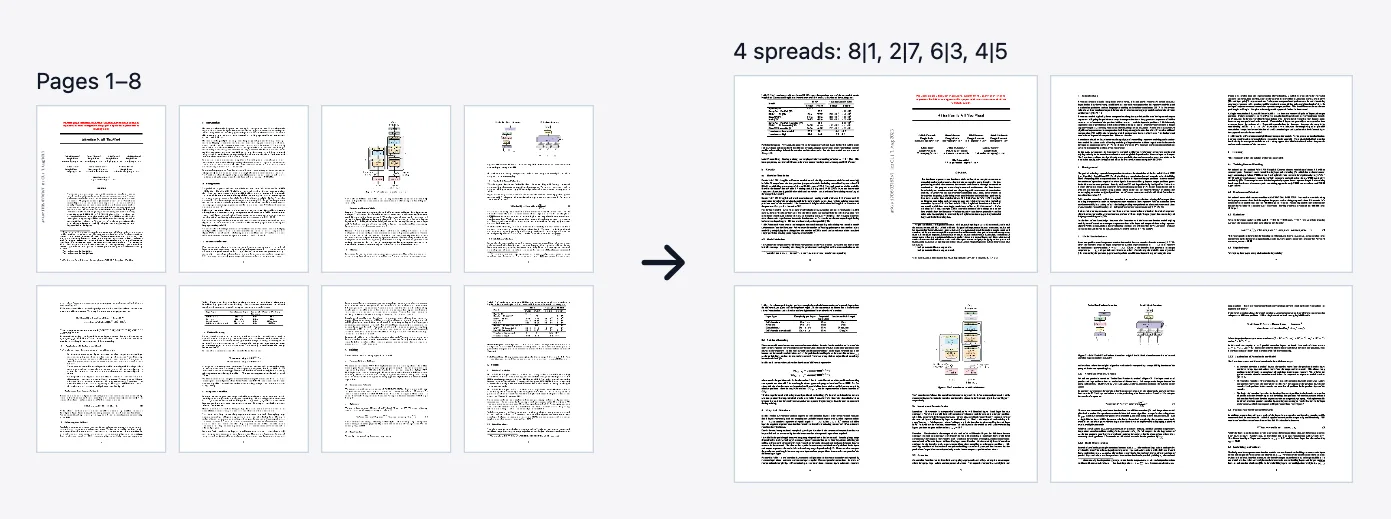
PDF Booklet reorders and pairs the pages of a PDF so that, printed double-sided and folded in half, they read in order as a booklet. It is saddle-stitch imposition: each output page is a spread of two source pages side by side.
The page count is padded with blank pages up to a multiple of four, because one folded sheet carries four pages. The front of the first sheet holds the last page on the left and page 1 on the right. Its back holds page 2 on the left and the second-to-last page on the right, and the order continues inward. An 8-page file becomes 4 spreads in the order 8 and 1, 2 and 7, 6 and 3, 4 and 5.
Each spread is twice the width of the first page and as tall as it. Pages are placed at their original size without scaling, so a file with mixed page sizes is not evened out; run Scale Pages first. Letter portrait pages make 17 by 11 inch spreads, so print with fit-to-page scaling onto Letter or A4 landscape paper.
To print, choose double-sided printing and flip on the short edge, then stack the sheets, fold the stack in half and staple along the fold. Pages are placed as vector content rather than rendered to pictures, and the source file is not changed.
There are no options. There is no gutter or margin, no allowance for the thickness of a long booklet, no right-to-left binding, and the whole document is one folded stack. For a long document, cut it into parts with Split by Page Count and impose each part. For a grid in reading order instead of booklet order, use Multiple Pages Per Sheet. Password-protected files are unlocked for you on this page once you enter the password; API callers run Unlock first.
Sifa
- Saddle-stitch imposition: each output page is a two-page spread
- Padded with blank pages to a multiple of four
- Spread is twice the first page's width; pages are not scaled
- No options to set
- Anonymous API at /api/v1/general/booklet-imposition
Lini utumie
- Print a 16-page program or zine as a folded booklet
- Turn a manual into a stapled pamphlet
- Make a handout that folds in half instead of a loose stack
How do I make a booklet from a PDF?
- Upload the PDF you want to turn into a booklet.
- Click Process. There are no options to set.
- Download the PDF and check the first spread: it should show the last page on the left and page 1 on the right.
- Print double-sided, flip on the short edge, fold the stack in half and staple along the fold.
Mipaka na hali maalum
- No gutter, margin, binding direction or creep settings
- Pages are not scaled; mixed page sizes are not evened out
- The whole document is one folded stack
- Spreads are larger than normal paper; print with fit-to-page scaling
- Upload limit on this website: 500 MB per file, sent in chunks above about 95 MB. A single direct API request body is capped at 100 MB.
Mifano
- An 8-page PDF becomes 4 spreads, ordered 8 and 1, 2 and 7, 6 and 3, 4 and 5
- A 5-page PDF is padded to 8 pages; the first spread has page 1 on the right and a blank on the left
- A 12-page Letter PDF becomes 6 spreads of 17 by 11 inches
Faragha ya zana hii
Files are uploaded over HTTPS, processed in memory or a short-lived temporary directory on our servers, and deleted when your result is ready. We do not keep copies for later browsing, training, or advertising profiles. See the Privacy Policy for retention details and AdSense cookie disclosures.
Maswali ya kawaida
- How do I print the booklet?
- Print double-sided and flip on the short edge, scaling to fit Letter or A4 landscape paper. Stack the sheets, fold them in half and staple along the fold.
- What if my page count is not a multiple of four?
- Blank pages are added after your last page until it is. For a 5-page file the first spread shows page 1 on the right and a blank on the left.
- Does it scale pages to fit the paper?
- No. Pages keep their size and each spread is twice the first page's width, so print with fit-to-page scaling.
- Can I bind on the right for right-to-left languages?
- No. The tool only produces left-to-right booklets.
- Can I make a booklet from a long document?
- The whole document is one folded stack, which gets thick. Cut it into parts with Split by Page Count and impose each part.
- How is this different from Multiple Pages Per Sheet?
- That tool keeps reading order in a grid. This one reorders pages into spreads so a folded print reads in order.
Ilisasishwa mwisho:
Tumia kutoka msimbo
Kila zana hapa ni REST. Matumizi bila kujisajili hayahitaji akaunti wala ufunguo wa API. Inafaa kivinjari, watengenezaji, na mawakala wa AI.
curl -X POST "https://pdf123.xyz/api/v1/general/booklet-imposition" \
  -F "[email protected]" \
  -o output.pdf
Pia inapatikana kama zana ya MCP kwa programu zinazotumia Model Context Protocol (JSON-RPC 2.0, POST /mcp). Maelezo kamili ya API
Itumie kupitia wakala wa AI
SkillUkiwa na skill hii, Claude Code, Codex, Cursor na mawakala wengine wa AI wanaweza kukuendeshea "PDF Booklet": /skills/pdf123-booklet-imposition.md
Faili inatumika kazi hii tu, kisha inafutwa yenyewe.