Print Several PDF Pages on One Sheet
Multiple Pages Per Sheet places 2 to 100 pages of a PDF onto each sheet of a new PDF, in a grid read left to right, then top to bottom. The sheet is sized from the first page, with no margins.
把文件拖到这里,或点击选择
支持 PDF · 单个文件不超过 500.0 MB · 一次最多 20 个文件
也可以按 Ctrl/Cmd+V 或从剪贴板菜单粘贴文件。
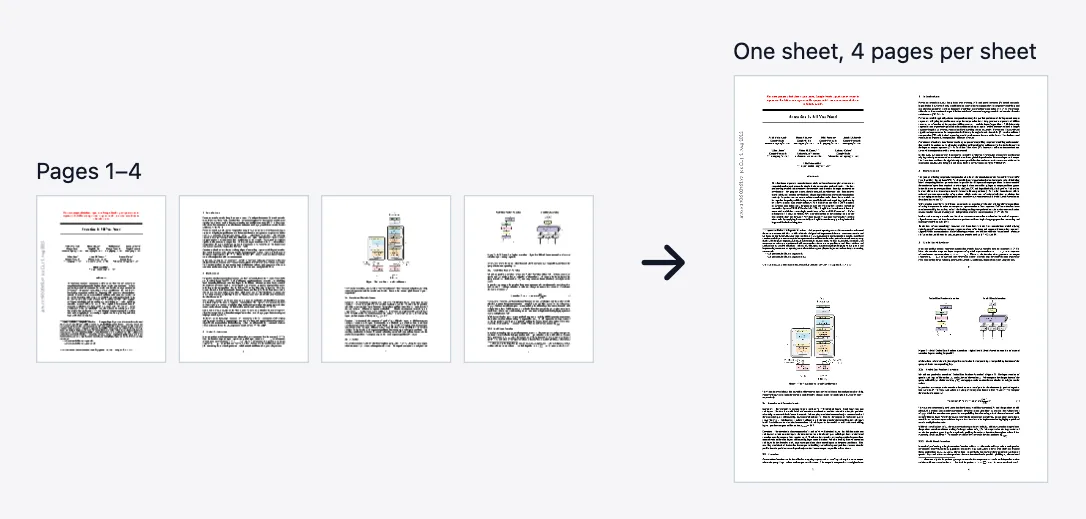
Multiple Pages Per Sheet places several pages of a PDF onto each sheet of a new PDF, in a grid. It is the n-up layout a print dialog offers, saved as a file you can check before printing: 2-up to save paper, 4-up for handouts, 9-up for an overview of a long document.
You set one number, pages per sheet, from 1 to 100 (the default is 2). The grid is the smallest near-square one that holds them: 2 gives two columns by one row, 3 and 4 give a 2 by 2 grid, 6 gives 3 by 2, and 9 gives 3 by 3. Pages are placed left to right, then top to bottom, so page 1 is at the top left.
The sheet is sized from the first page. Its width is the number of columns times the first page's width, and its height is the number of rows times the first page's height, so two Letter portrait pages make a 17 by 11 inch landscape sheet. Every page is scaled to the first page's size, width and height separately, which stretches a page whose shape differs. Run Scale Pages first when the pages are not all the same size.
There are no margins, gaps or borders between pages and no paper-size setting. To print, send the result to your printer with fit-to-page scaling so the larger sheet shrinks onto Letter or A4. Pages are placed as vector content rather than rendered to pictures, and the source file is not changed.
The result has one page per sheet, so a document that does not divide evenly leaves empty cells on the last sheet. For a folded booklet, where pages must be reordered, use PDF Booklet. To print only some pages, run Extract Pages first. Password-protected files are unlocked for you on this page once you enter the password; API callers run Unlock first.
功能
- 1 to 100 pages per sheet, default 2
- Grid filled left to right, then top to bottom
- Sheet sized from the first page; other pages are scaled to its cell
- Pages placed as vector content, not rendered to images
- Anonymous API at /api/v1/general/multi-page-layout
适用场景
- Print a 20-page handout on 5 sheets with 4 pages per sheet
- Make an overview sheet of a long document at 9 pages per sheet
- Save paper when printing drafts at 2 pages per sheet
How do I put multiple PDF pages on one sheet?
- Upload the PDF you want to lay out.
- Enter the number of pages per sheet, such as 2, 4, 6 or 9.
- Click Process and download the PDF.
- Open it and check the order, then print with fit-to-page scaling so each sheet fits your paper.
限制与边界
- No margins, gaps, borders or paper-size choice
- The sheet is larger than normal paper; print with fit-to-page scaling
- Pages are scaled to the first page's size, which stretches pages of a different shape
- At most 100 pages per sheet
- Upload limit on this website: 500 MB per file, sent in chunks above about 95 MB. A single direct API request body is capped at 100 MB.
示例
- A 4-page Letter document at 4 pages per sheet becomes one 2 by 2 sheet of 17 by 22 inches
- A 10-page PDF at 2 pages per sheet becomes 5 sheets
- Seven pages at 4 per sheet make 2 sheets; the last holds 3 pages and one empty cell
本工具的隐私说明
Files are uploaded over HTTPS, processed in memory or a short-lived temporary directory on our servers, and deleted when your result is ready. We do not keep copies for later browsing, training, or advertising profiles. See the Privacy Policy for retention details and AdSense cookie disclosures.
常见问题
- How many pages can I put on one sheet?
- From 1 to 100. Common choices are 2, 4, 6 and 9, which make the grids 2 by 1, 2 by 2, 3 by 2 and 3 by 3.
- In what order are the pages placed?
- Left to right, then top to bottom, so page 1 is at the top left and the last page of a full sheet is at the bottom right.
- What size is the output sheet?
- A multiple of the first page's size: columns times its width by rows times its height. Two Letter portrait pages make a 17 by 11 inch sheet, so print with fit-to-page scaling.
- Why do some pages look stretched?
- Each page is scaled to the first page's width and height separately. A page with a different shape is stretched to fit, so run Scale Pages first when the sizes differ.
- Can I add margins, gaps or borders?
- No. Pages touch each other, and there is no setting for spacing or frames.
- How is this different from PDF Booklet?
- This tool keeps reading order in a grid. PDF Booklet reorders the pages into two-page spreads so a double-sided, folded print reads in order.
最后更新:
用代码调用
本站每个工具都是普通 REST 接口。匿名使用不需要账号或 API Key,给浏览器、开发者和智能体同样可用。
curl -X POST "https://pdf123.xyz/api/v1/general/multi-page-layout" \
  -F "[email protected]" \
  -F "pagesPerSheet=2" \
  -o output.pdf
也提供 MCP 工具,供说 Model Context Protocol 的客户端调用(JSON-RPC 2.0,POST /mcp)。 完整 API 文档
在 AI 代理中使用
Skill装上这个 Skill,Claude Code、Codex、Cursor 等 AI 代理就能替你完成「每张多页」: /skills/pdf123-multi-page-layout.md
文件只用于本次处理,完成后自动删除。