Put Two PDF Pages on One Sheet
2 Pages Per Sheet PDF places every two consecutive pages of a PDF side by side on one new sheet and returns a new PDF. The pages keep their size, so a Letter file becomes 17 by 11 inch sheets.
Drag and drop files here, or click to choose
Accepts PDF · up to 500.0 MB per file · up to 20 files at once
You can also paste a file with Ctrl/Cmd+V, or from the clipboard menu.
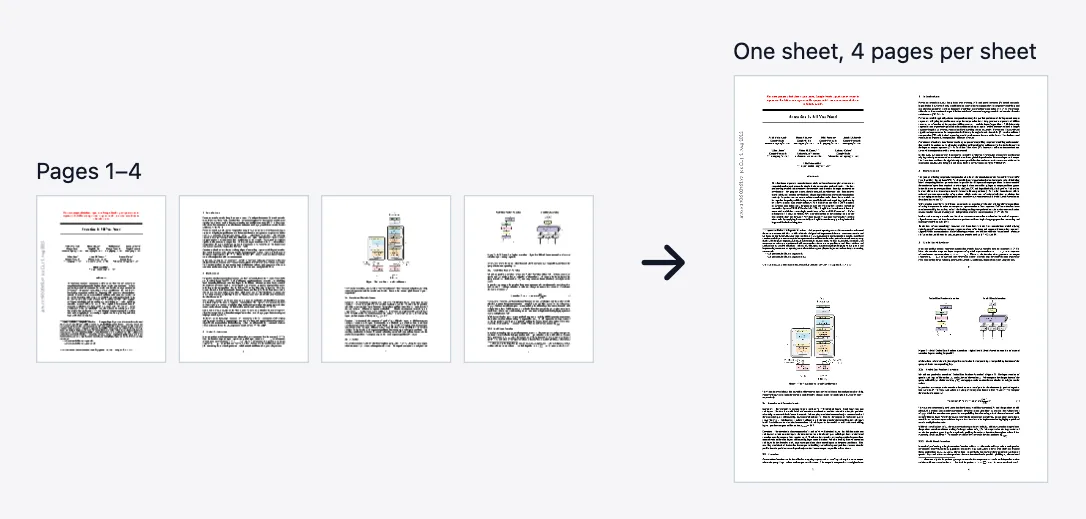
Two pages per sheet saves paper for handouts, slides and long drafts: instead of one page per sheet, the pages go in pairs. The tool takes pages 1 and 2, then 3 and 4, and so on, and puts each pair side by side on one new page, left to right in page order. The pages per sheet field is already set to 2.
The pages are placed at full size, not shrunk. In our test, a 10-page Letter PDF (612 by 792 points) came back as 5 sheets of 1224 by 792 points, which is two Letter pages next to each other, 17 by 11 inches. To print on Letter or A4 paper, pick fit to page (or shrink to printable area) in the print dialog, or run the result through Scale Pages to the paper size first.
An odd number of pages leaves the last sheet with one page. The result is a new file, so the original stays as it was, and text stays selectable because the pages are placed as they are, not turned into pictures. The file grows a little: the 10-page test file went from 2,694 to 9,051 bytes.
Type another number for other layouts. 4 gives a 2 by 2 grid, 6 gives 3 across and 2 down, and 9 gives a 3 by 3 grid. For a folded booklet use PDF Booklet instead, which orders the pages so the printed sheets fold into a booklet.
Features
- Pages per sheet preset to 2, changeable up to 100
- Pages placed at full size, side by side, in page order
- Text stays selectable; nothing is turned into an image
- A new PDF is returned and the original is not changed
When to use this tool
- Printing lecture slides or handouts on half the paper
- Reviewing two consecutive pages of a long draft side by side on screen
- Preparing a two-up proof before printing
How do I put 2 pages on one sheet of a PDF?
- Upload the PDF
- Keep 2 in the pages per sheet field, or enter another number
- Click Process and download the new PDF, then print it with fit to page
Limits and edge cases
- The sheet grows to hold the pages; it does not shrink them to the original paper size
- The pages are not rotated or reordered for double-sided printing or folding
- An odd page count leaves one page alone on the last sheet
- Password-protected files need their password first
Test results and conditions
- Test file: a 10-page PDF generated for this project's test suite, one line of text per page.
- Pages per sheet 2 returned 5 sheets of 1224 by 792 points from the 10 Letter pages, each sheet holding two consecutive pages in order.
- Pages per sheet 4 returned 3 sheets of 1224 by 1584 points, the last holding only pages 9 and 10; 6 and 9 per sheet returned 2 sheets each.
- The 2-up file was 9,051 bytes against 2,694 for the 10-page input, and the text of every page could still be extracted.
Privacy for this tool
Files are uploaded over HTTPS, processed in memory or a short-lived temporary directory on our servers, and deleted when your result is ready. We do not keep copies for later browsing, training, or advertising profiles. See the Privacy Policy for retention details and AdSense cookie disclosures.
Frequently asked questions
- Will the sheets fit on my printer paper?
- Not as they are. Two Letter pages side by side make a 17 by 11 inch sheet. Print with fit to page, or run the result through Scale Pages to the paper size first.
- In what order are the pages placed?
- In page order, left to right: the first sheet holds pages 1 and 2, the second pages 3 and 4. With more pages per sheet they fill each row in turn.
- What happens with an odd number of pages?
- The last sheet holds the single remaining page. A 10-page file gives 5 sheets; an 11-page file gives 6, the last with one page.
- Can I put 4 or 6 pages on a sheet instead?
- Yes. Change the number: 4 gives a 2 by 2 grid, 6 gives 3 across and 2 down. The number can be from 1 to 100; anything else is rejected.
- Is this the same as a booklet?
- No. This keeps the pages in order and does not prepare them for folding. PDF Booklet reorders the pages so the printed sheets fold into a booklet.
Last updated:
Call this from code
Every tool on this site is a plain REST endpoint - no account or API key needed for anonymous use. Built for AI agents and developers as much as for browsers.
curl -X POST "https://pdf123.xyz/api/v1/general/multi-page-layout" \
  -F "[email protected]" \
  -F "pagesPerSheet=2" \
  -o output.pdf
Also available as an MCP tool for agent clients that speak Model Context Protocol (JSON-RPC 2.0 over POST /mcp). Full API reference
Use it from an AI agent
SkillClaude Code, Codex, Cursor and other AI agents can run Multiple Pages Per Sheet for you with this skill: /skills/pdf123-multi-page-layout.md
Files are used only for this processing job and deleted automatically afterward.